
Website performance remains critical in determining the success of any website or web application. Users have long been conditioned to expect instant responses when browsing the web. Research indicates 40% of visitors will exit a page that takes longer than 3 seconds to load, with almost 80% exiting after 5 seconds. In this article, we’ll explore the meaning of website performance and optimisation, using practical and analogical examples, and define common techniques used to boost web performance.
“Web performance is how long a site takes to load, become interactive and responsive, and how smooth the content is during user interactions.” Mozilla
The World Wide Web operates on a client-server, request-response paradigm. Whenever a user types a URL into a browser or clicks a link on a webpage, the following transactions take place:
- The client (browser) prepares the user’s request.
- The user request is sent to the server.
- The server processes the request and packages a response.
- The response is returned to the client.
- The client renders the response (displays the webpage).
Since these steps are repeated for every user on every request, inefficiencies are inevitable. However, each step in the transaction can be optimised to improve speed, thereby improving the website’s performance and consequently the user experience. Next, we’ll explain how each step in the transaction can be optimised in more detail.
Reducing HTTP requests (Step 1)
When you open a link or type in a URL into a browser, the browser creates a request on your behalf through the Hypertext Transfer Protocol (HTTP). The HTTP request contains instructions to retrieve GET a resource from the server. On the dynamics website and web applications, users may also send POST, update PUT or remove DELETE a resource.
In simple terms, the more HTTP requests sent to the server, the longer it takes for the site to load. Why? Because the browser assumes all resources requested are equally important, they all have to be loaded before rendering starts. Think of it as a builder waiting for all their important building materials to be on site before continuing the project. The good news is that modern browsers do a better job of knowing what resource is needed when and prioritise accordingly. Rendering can start immediately with the needed resources while fetching and queuing additional resources later (Lazy loading). However, they do not always get this sequence right, but there are ways to force their hand, as will be discussed later.
Here are some common ways to reduce HTTP requests:
- Combine multiple stylesheets and scripts into a single file. This will likely increase the size of the individual file sizes, but it still doesn’t outweigh the benefits gained from reduced requests.

- Combine multiple related images into image sprites and use CSS to display them. E.g. if you wanted to show the flag of every country on your page, you would need to make at least 195 requests, or you could combine all the flags into one image file and request it once. Alternatively, if you have multiple SVG files, they can be inlined into the HTML file and requested once.

- Reducing frivolous requests; only request what’s needed for the page to function. This is especially key for sites that use external assets and plugins.
- Cache static resources (images, styles, scripts) so they are not repeated in future requests. More on this later
Content Delivery Networks (Steps 2 & 4)
Marketing labels like ‘The cloud’ or ‘Internet of Things’ often hide the real backbone of the Internet, which at its rudimentary, is a system of interconnected computers communicating through radio waves and as light pulses through fibre-optic cables lying on the bottom of the ocean. Regardless of the method, it is important to recognise the oftentimes long paths information takes to get to our devices.

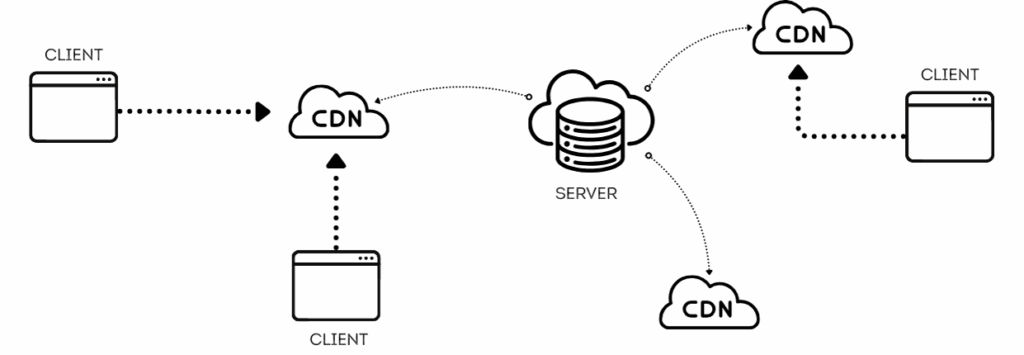
The only way to overcome this built-in latency is to physically reduce the distance between communicating devices. We can serve assets (resources) closer to clients through the use of a Content Delivery Network (CDN). CDN works by replicating your assets across servers situated in multiple locations and serving client requests from the closest server. Important to note that the core function of CDN is to reduce latency; thus must be used in conjunction with other methods prescribed.
Server-side Optimisation (Step 3)
So you’ve limited requests, minimised and optimised your assets, yet your site is still not scoring a 100 on pagespeed for performance. The issue may well lie with your server. However, server-side optimisations are comparatively more complex and/or expensive to implement, plus they may not have immediate discernible impacts on speed as you would expect. As the saying goes, the last drop of juice is often the hardest to squeeze.
Some server optimisation techniques include caching, database sharding, load balancing, CDN, message queuing and hardware upgrades (i.e. switching to a faster CPU or upgrading from HDD to SSD drives), and many more. You may require some or all of these techniques depending on your site’s performant needs. Serving assets through a Content Delivery Network (CDN) can generally be beneficial to websites of all sizes, whereas implementing a Kafka stream to serve data is certainly overkill for most websites. In my opinion, most of the server-side optimisation techniques are best suited to sites that serve a lot of content to a lot of users (e.g Netflix), where even micro improvements in speed have more impact.
Resource hinting, lazy loading, and
browser caching(Step 5)
Each transaction begins and ends in the browser, so it’s important to use a browser that’s been optimised for speed. Unfortunately, you cannot control what browser your end users will use. Most modern browsers do a decent job of caching static assets, reducing the number of server round-trips and speeding up page rendering. But instead of leaving it up to the browsers, developers can instruct browsers on how to load external resources through asynchronous loading or deferring JavaScript files; preloading or prefetching CSS, icons and fonts.


Developers can prevent the browser from blocking rendering while external resources load. This article does a great job explaining resource hints in detail, so there isn’t any need to expand further on here.
In conclusion
This article explores some website optimisation techniques and contexts around each. While site speed is undoubtedly important, it’s not the only metric that matters. Performance is a multidimensional concept, encompassing everything from load times and responsiveness to visual stability and accessibility. At its core, web performance refers to how quickly and efficiently a website loads and responds to user interactions. It’s the behind-the-scenes force that can make or break user experience, influence search engine rankings, and directly impact business outcomes like conversions and revenue.